AI-POWERED PLC DIAGNOSTICS

Stop Guessing Why Your Machine Is Down.
AlarmIQ Tells You.

Alarm root cause in seconds. 5-minute pre-alarm replay. Safe equipment control. 100% offline after commissioning — no internet required.

Operator asks: “Why won’t my machine start?”
AlarmIQ reads the controller, traces the logic, and answers:
“Circuit Breaker 4 is open. All other interlocks are satisfied.”

Download the Platform Guide Watch Demo
< 5 sec
Root cause identification
5 min
Pre-alarm replay window
Offline
No internet after install
Zero
Manual configuration
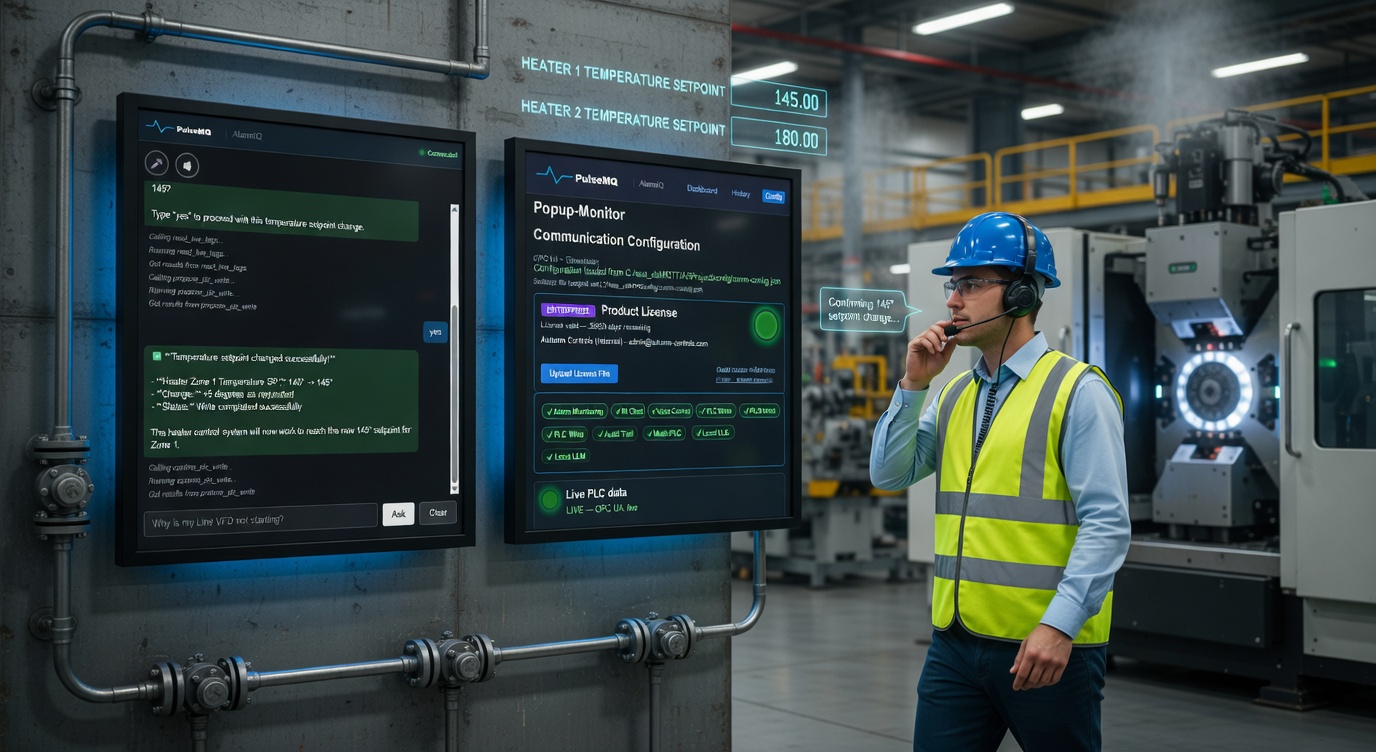
AlarmIQ alarm diagnostics dashboard showing live root-cause trace on factory floor

The Problem Every Plant Knows

A machine goes down. The HMI shows 14 alarms. Only one is the actual cause — the rest are noise. Sound familiar?

Alarm Overload

Average industrial systems produce 1,200+ alarm events per day. Operators learn to ignore most of them. The one that matters gets buried in the flood.

Troubleshooting Takes Too Long

A technician opens the control program, traces the logic, cross-references I/O lists, checks wiring diagrams. What should take minutes takes an hour — while the line sits idle.

Knowledge Walks Out the Door

Your senior controls engineer knows exactly which relay feeds which interlock. When they retire, that knowledge disappears. New hires are left staring at a control program they don’t understand.

Dashboards Don’t Explain “Why”

Traditional SCADA and alarm management tools show you what is alarming. They don't tell you why. You still need a controls engineer to interpret the data.

AlarmIQ: An AI That Understands Your Plant

AlarmIQ reads your controller program, learns the logic, and connects to the live equipment in real time. When an alarm fires, it doesn’t just show you a red light — it traces the entire chain from the alarm output back through every interlock, timer, and comparison to the physical input that caused it. It also captures the minutes before every trip for replay, and explains everything in plain language.

Talk to it from a workstation, or speak to it through a headset while your hands are on the machine.

Air-Gap Ready

100% Offline After Initial Commissioning.
No Internet Required.

Once AlarmIQ is installed on your network, it runs entirely on your hardware — no cloud calls, no telemetry, no license check-ins. Disconnect from the internet and AlarmIQ keeps working. Your controller data never leaves your facility.

Your data stays put

PLC tags, alarm history, replay buffers, and operator transcripts never leave your network. No third-party cloud storage.

Offline AI option

Run the AI assistant on a local model installed on your own hardware. No outbound API calls. Available as an offline deployment option — contact sales for details.

Works on isolated networks

Air-gapped plants, OT/IT segregated networks, secure manufacturing environments — AlarmIQ works the same as on a connected network.

No license check-ins

Licenses are validated once during commissioning. AlarmIQ won’t stop working if your internet goes down or you disconnect intentionally.

Built for the reality of factory IT: firewalls, isolated VLANs, no outbound HTTPS. AlarmIQ ships ready for air-gap deployment.

The Platform

Where AlarmIQ™ Fits

AlarmIQ™ is the engineering layer of the PulseMQ™ platform — the layer that reads live PLC logic and turns it into plain-language answers. Above it, production analytics. Below it, standards-based connectivity.

PulseMQ platform architecture: PulseMQ-Edge acquires from PLCs, the Engineering Layer contains AlarmIQ, PulseMQ Manufacturing runs OEE and MES, feeding dashboards and APIs

From the PulseMQ Platform Guide. Download the full guide to see how every layer works together.

Connectivity

One Hub. Every Controller, Every Screen.

PulseMQ-Edge™ runs as a node beside your line. Controllers feed it read-only. It normalizes every tag and publishes one clean stream — to the broker, to the cloud, to AlarmIQ.

PulseMQ Edge hub topology: Allen-Bradley, Siemens, and Micro800 controllers feed read-only into the PulseMQ Edge Node, which publishes out to MQTT Broker, PulseMQ Cloud, and AlarmIQ

From the PulseMQ Platform Guide. One Edge node handles a full line — add a second for the next.

Capabilities

Everything AlarmIQ Brings to Your Plant Floor

A single platform that reads your live PLC logic, learns how your equipment normally behaves, and answers the questions your team actually asks. Below are the named capabilities that ship with AlarmIQ today.

Any controller
Your PLCs
Allen-Bradley Siemens S7 Beckhoff, B&R
The engine
AlarmIQ™
Reads live logic Learns normal behavior Explains in plain English
Your team
PulseMQ Dashboard
Operators Maintenance Engineering

One connected system. No new logins. No new screens. AlarmIQ answers where your team already looks.

Engineering Conversation™

Ask the machine, in plain English. Get evidence-based answers grounded in live PLC state.

Machine Intelligence™

Learns how each machine normally behaves. Flags the moment it drifts.

Replay™

Rewind the seconds before every fault. See what actually happened.

Ladder Logic Viewer

Live rung view. See what’s blocking the line without opening Studio 5000.

SFC Viewer

Sequential Function Charts, live. Know which step is active in real time.

Sequence Diagrams

Visualize batch and continuous operations as they run. Great for training.

Automatic PID Loop Monitoring & Evaluation

For every loop, all the time. See which loops need attention before they cause a stop.

S7 Browser

Native Siemens S7 support. Tags, blocks, and program structure.

Audit Trail

Every write, every action, every operator confirmation — logged for the record.

See It Live on Your Equipment

A 20-minute walkthrough on your PLC. No slides, no theater — just the real thing.

What AlarmIQ Does

Trace Any Alarm to Its Physical Root Cause

When an alarm fires, AlarmIQ doesn’t stop at the trigger. It follows the entire chain of conditions that led to the trip — through every interlock, timer delay, alternative path, and threshold check — all the way to the physical sensor or switch that caused it.

  • Multi-level tracing — walks the condition chain up to 5 steps deep
  • Timer delay resolution — delayed alarms traced to the original condition that started the timer
  • Parallel branch detection — shows which alternative path triggered the alarm
  • Live values on every condition in the trace chain
  • Works with existing controller programs — no add-on code needed
Live Trace Example
alm_air_condition ACTIVE
tmr_air_delay.DN = TRUE
DI_Air_Pressure_OK = FALSE (expected: TRUE)
Root cause: Air pressure sensor — physical input is OFF

Ask Questions in Plain English — Get Real Answers

AlarmIQ isn't a chatbot with canned responses. It reads live tag values from your PLC, checks interlock states, and gives you answers based on what the equipment is actually doing right now.

  • Read any tag on demand — temperatures, setpoints, UDT members
  • Explain alarm conditions in operator-friendly language
  • Trace root cause of any tag (not just alarms)
  • Review alarm history and identify patterns
  • Works with Claude AI or offline local models
AI Chat Example
Operator: Why is heater zone 1 faulted?
AlarmIQ: Heater Zone 1 over-temperature alarm is active. Current temperature is 412°F, setpoint is 380°F. The cooling valve (SOL_CoolWater_Z1) is closed. Opening the cooling valve should bring the temperature back into range.

Hands-Free Diagnostics on the Factory Floor

When you're standing at the machine with tools in both hands, you can't type. AlarmIQ supports full voice interaction — ask questions, get spoken answers, and confirm equipment operations without touching a screen.

  • Push-to-talk activation — no accidental triggers
  • Spoken root-cause explanations while you work
  • Voice-confirmed equipment start/stop
  • Works with standard Bluetooth headsets or built-in mic
  • Designed for noisy factory environments
Voice Interaction
[PTT] “What's the air pressure reading?”
AlarmIQ: “Air pressure is currently 72 PSI. The low-pressure alarm threshold is 65 PSI. You have margin.”
No screen. No keyboard. Just answers.

Control Equipment Safely — With Full Audit Trail

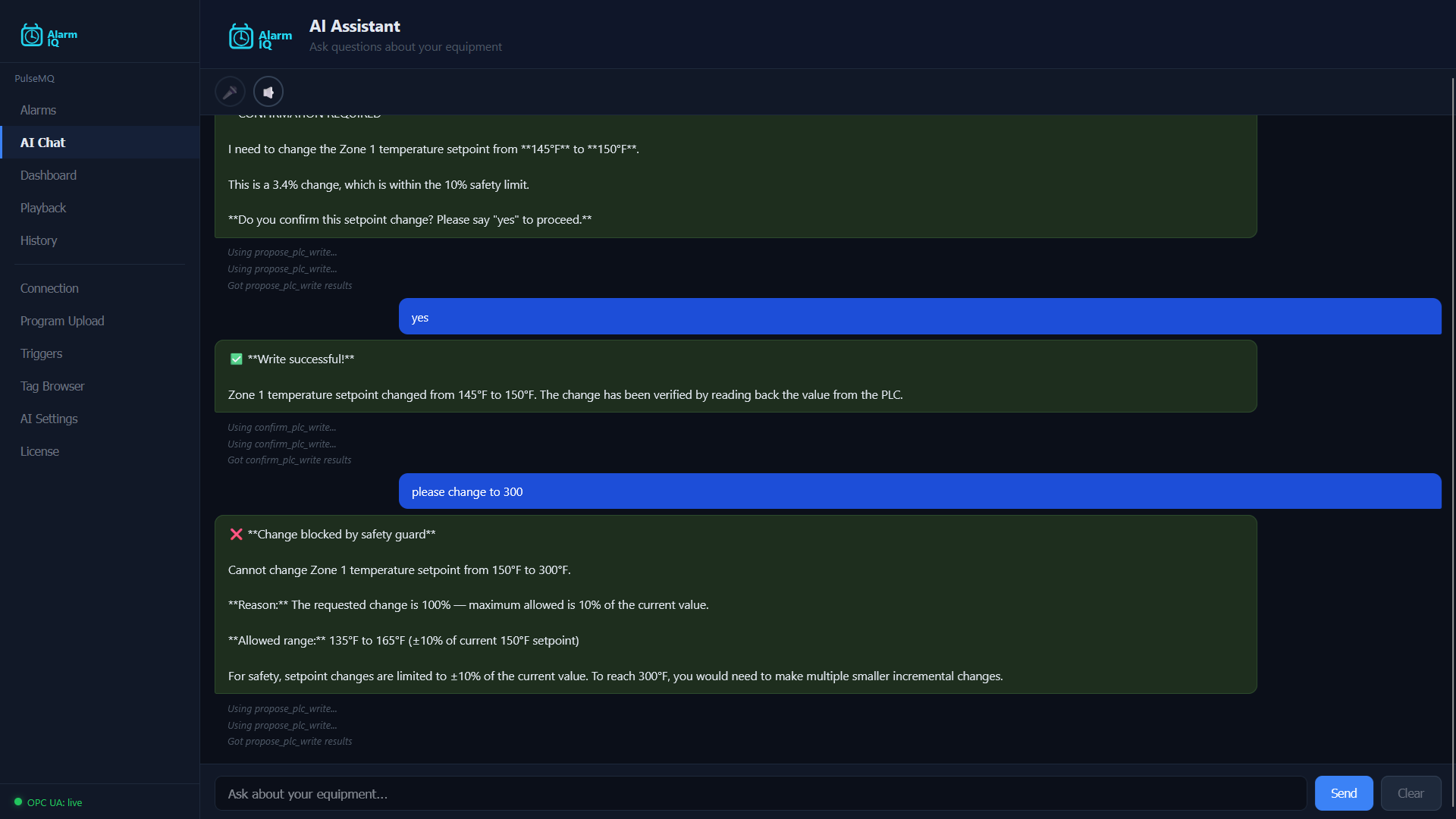
Start motors, change setpoints, and reset faults through the AI assistant. Every action goes through a safety pipeline: the system proposes, the operator confirms, and everything is logged.

  • Two-step confirmation — propose, then confirm
  • 10% setpoint guard prevents large accidental changes
  • Safety tag blacklist — critical tags are never writable
  • Write-then-verify — reads back after every write to confirm
  • Controller mode check — blocks writes if PLC is in program mode
  • Every operation logged with full context and timestamp
Write Confirmation Flow
Operator: Set heater zone 1 to 385 degrees
AlarmIQ: Change Heater_Zone1.Setpoint from 380°F to 385°F? (1.3% change — within 10% guard)
Operator: Yes, confirm
AlarmIQ: Write successful — verified by read-back. Value confirmed: 385°F

See Patterns. Eliminate Nuisance Alarms.

AlarmIQ logs every alarm event with its root-cause data, condition snapshot, and related alarms. Over time, this builds a dataset that reveals which alarms are noise, which cascade together, and where your real problems are.

  • 24-hour alarm timeline — visual Gantt chart of alarm activity
  • Frequency and duration statistics per alarm
  • Cascade detection — which alarms always fire together
  • Root cause clustering — group alarms by shared physical cause
  • Export data for engineering review
Alarm Analytics Snapshot
Top 3 alarms (24h)
1. alm_air_condition — 12 events, avg 4.2 min
2. alm_heater_overtemp — 3 events, avg 18 min
3. alm_conveyor_jam — 2 events, avg 6 min
Air pressure alarm fires 12x/day → likely a nuisance alarm. Investigate sensor or threshold.

Point It at Your PLC. AlarmIQ Does the Rest.

No manual tag mapping. No configuration spreadsheets. Connect to your controller and AlarmIQ automatically discovers every alarm, interlock, timer, and cross-reference. It builds the entire diagnostic model for you.

  • Automatic alarm and interlock discovery
  • Builds root-cause trace chains without manual setup
  • Creates an AI knowledge base from your equipment
  • Works with Allen-Bradley, Siemens, Beckhoff, and more
  • Full setup in under 10 minutes
Setup Timeline
0:00 Download and install (2 min)
0:02 Enter your controller’s IP address
0:03 AlarmIQ connects and discovers your equipment
0:05 174 alarm mappings generated automatically
0:06 Live alarms with root-cause traces running
0:08 AI assistant ready — ask your first question
From download to live diagnostics: under 10 minutes.

Rewind the 5 Minutes Before Every Alarm

When an alarm trips, AlarmIQ doesn’t just tell you what happened — it gives you a full replay of the minutes leading up to the event. Every monitored value, every operator action, every state change, captured automatically and frozen at the moment of the trip. Your reliability engineer can walk backwards from the alarm and see exactly which signal moved first, when, and why — without hunting through a separate historian.

  • Continuous capture of every monitored value — always running
  • Automatic freeze the instant any alarm latches
  • Replay timeline of every signal and every transition
  • Operator action log — button presses, mode changes, setpoint edits
  • Plain-language narration of what happened, on demand
  • No separate historian, no per-event trigger configuration, no data fees
Pre-Alarm Replay Example
Event: Zone 1 High Temperature Alarm
Tripped at 14:23:47
14:19:08 → Operator switched makeup air to manual
14:19:12 → Fan speed dropped from 42 to 18
14:19:30 → Temperature began rising
14:22:00 → Reached 245°F
14:23:47 → High-limit trip latched at 250°F
Root cause: manual fan override → airflow loss → temperature runaway. 2 minutes instead of 2 hours.

This Replaces Three Separate Tools

Most plants buy three different products to do what AlarmIQ does in one — alarm management, event playback, and operator assistance. Here’s how it compares.

The Old Way (3 Separate Products)

  • × Alarm management tools that show what’s active but never why
  • × Historians that capture everything but can’t scope an event
  • × Operator assistance tools that sit outside the control system entirely
  • × Require weeks of configuration and dedicated infrastructure
  • × Each tool built for a different user — none talk to each other
  • × Combined cost: $30,000–$100,000 per plant per year

AlarmIQ

  • ✓ Shows why each alarm is active — root cause, live values, plain language
  • ✓ Built-in pre-alarm replay — no separate historian required
  • ✓ Auto-discovers every alarm and interlock by reading the controller
  • ✓ Setup in under 10 minutes — point it at your controller and go
  • ✓ One product, one install, one price — operators and engineers share it
  • ✓ Runs on a Windows laptop — no infrastructure, no cloud required
  • ✓ Fraction of the combined cost of the stack it replaces

Where AlarmIQ Makes the Difference

Real scenarios from production floors, commissioning sites, and maintenance shops.

Troubleshooting

Machine Won't Start After Weekend Shutdown

Monday morning. The line won't start. HMI shows 8 active alarms. The operator asks AlarmIQ: “Why won't the machine start?”

AlarmIQ traces all 8 alarms, identifies that 7 are cascading from a single interlock, and reports: “Guard door switch on panel 3 is open. All other conditions are satisfied.”

Resolution: 2 minutes instead of 45. The door was left ajar during weekend maintenance.
Commissioning

First-Time Startup of a New Line

Controls engineer is on-site commissioning a new packaging line. The control program is freshly written. Instead of manually walking through every alarm condition to verify wiring, they connect AlarmIQ and let it map everything automatically.

“Show me all active faults.” — AlarmIQ lists each alarm with the physical sensor that's causing it. The engineer walks down the line, fixing wiring issues in real time with AlarmIQ as a live assistant.

Commissioning shortened by 2 days. Every interlock verified against live I/O.
Recurring Downtime

Air Pressure Alarm Fires 12 Times a Day

The air pressure fault alarm has been firing repeatedly for weeks. Operators acknowledge it and move on. Plant manager asks: “Why do we keep getting this alarm?”

AlarmIQ's analytics show the alarm fires every 47 minutes, lasts 3–4 minutes, and always coincides with the compressor cycling off. The root cause: the pressure switch threshold is set 2 PSI above the compressor's low-cycle pressure.

Fix: Adjust the alarm threshold by 3 PSI. Nuisance alarm eliminated. 12 fewer interruptions per day.

The Impact on Your Operation

AlarmIQ pays for itself the first time it saves you from a 30-minute troubleshooting session — and keeps paying every day it cuts root-cause hunts from hours to minutes.

70%
Faster root cause identification
10–30 min
Saved per alarm event
2–5%
OEE improvement from reduced downtime
100%
Write operations audited and traceable

Works With Your Equipment

AlarmIQ connects to the controllers you already have installed. No special hardware or gateway required.

AVAILABLE NOW
Allen-Bradley
ControlLogix and CompactLogix. Automatic alarm and interlock discovery from your controller program.
COMING SOON
Siemens
S7-1200 and S7-1500. Same root-cause tracing and AI diagnostics across your Siemens equipment.
COMING SOON
Beckhoff, B&R, and More
Works with dozens of modern controller platforms. If your PLC has a network connection, AlarmIQ can talk to it.

Up and Running in 10 Minutes

1
Download & Install
Single zip file. Extract, run the installer. No dependencies, no Docker, no IT ticket. Runs on Windows 10/11.
2
Connect to Your Controller
Enter your controller’s IP address. AlarmIQ connects and verifies communication automatically.
3
Discover Your Equipment
AlarmIQ reads your controller program and automatically discovers every alarm, interlock, and root-cause chain. Zero manual configuration.
4
Start Diagnosing
Live alarms with root-cause traces are running. Open the AI chat and ask your first question. Use voice mode on the factory floor.

See AlarmIQ in Action

Real screenshots from a live installation connected to an Allen-Bradley ControlLogix. Click any image to enlarge.

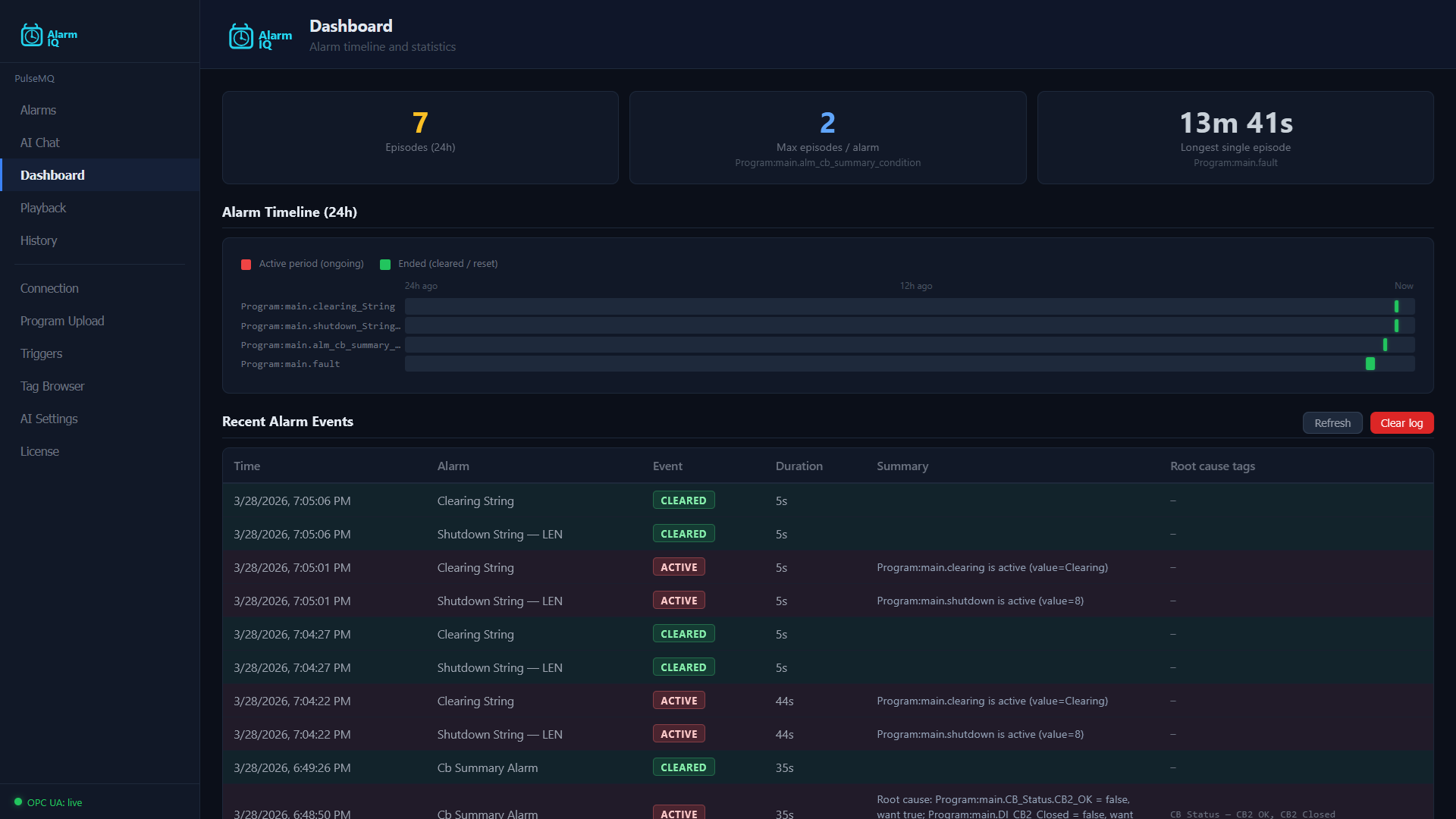
AlarmIQ Dashboard showing alarm timeline, active alarms count, and recent alarm events with root cause analysis

Dashboard

Alarm timeline, active/cleared counts, average resolution time, and recent events with root-cause tags.

Click to enlarge
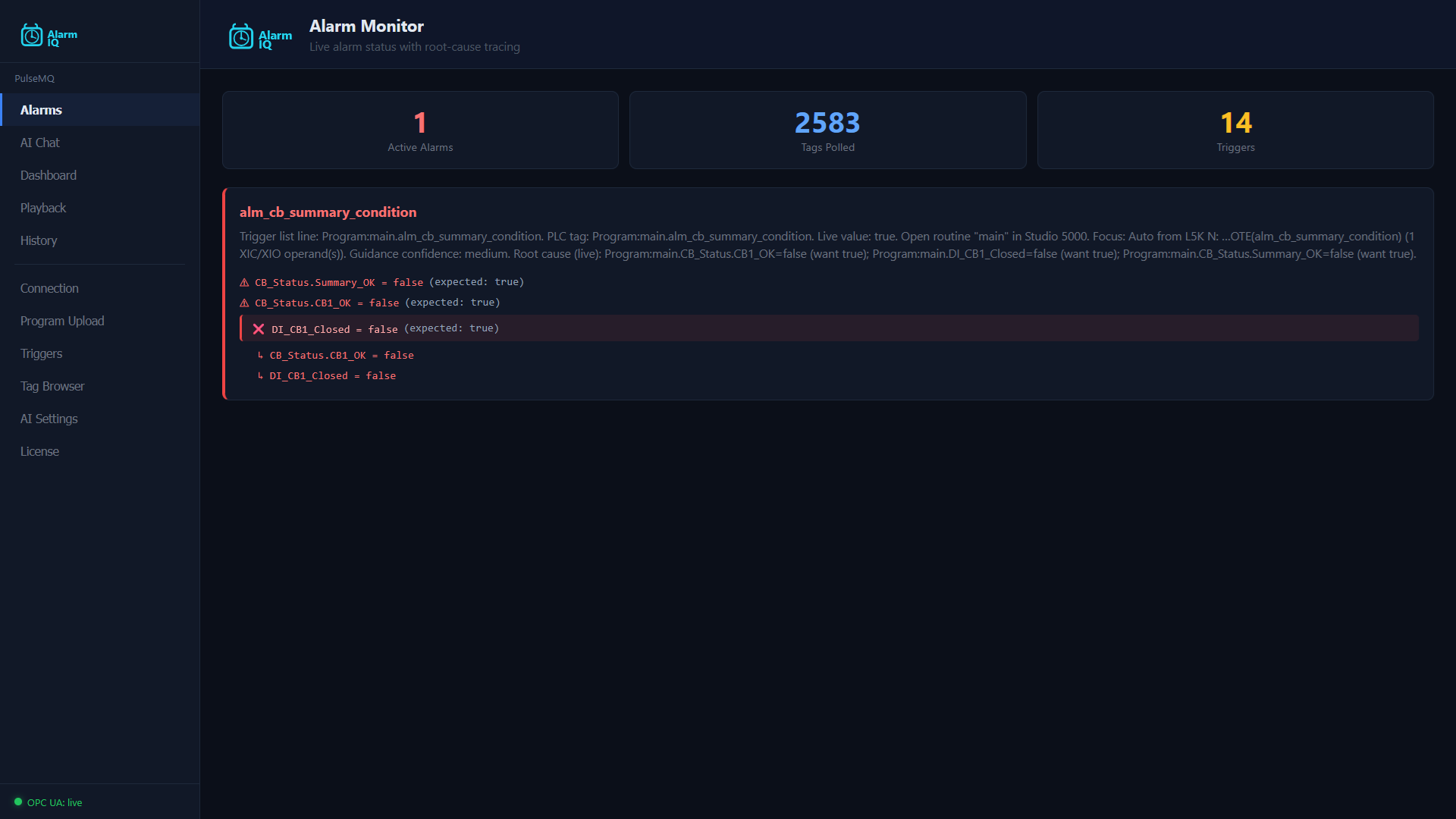
AlarmIQ Alarm Monitor showing live root-cause trace with permissive evaluation and tag polling status

Live Root-Cause Tracing

Real-time permissive evaluation with color-coded pass/fail. 2,500+ tags polled, every interlock scored live.

Click to enlarge
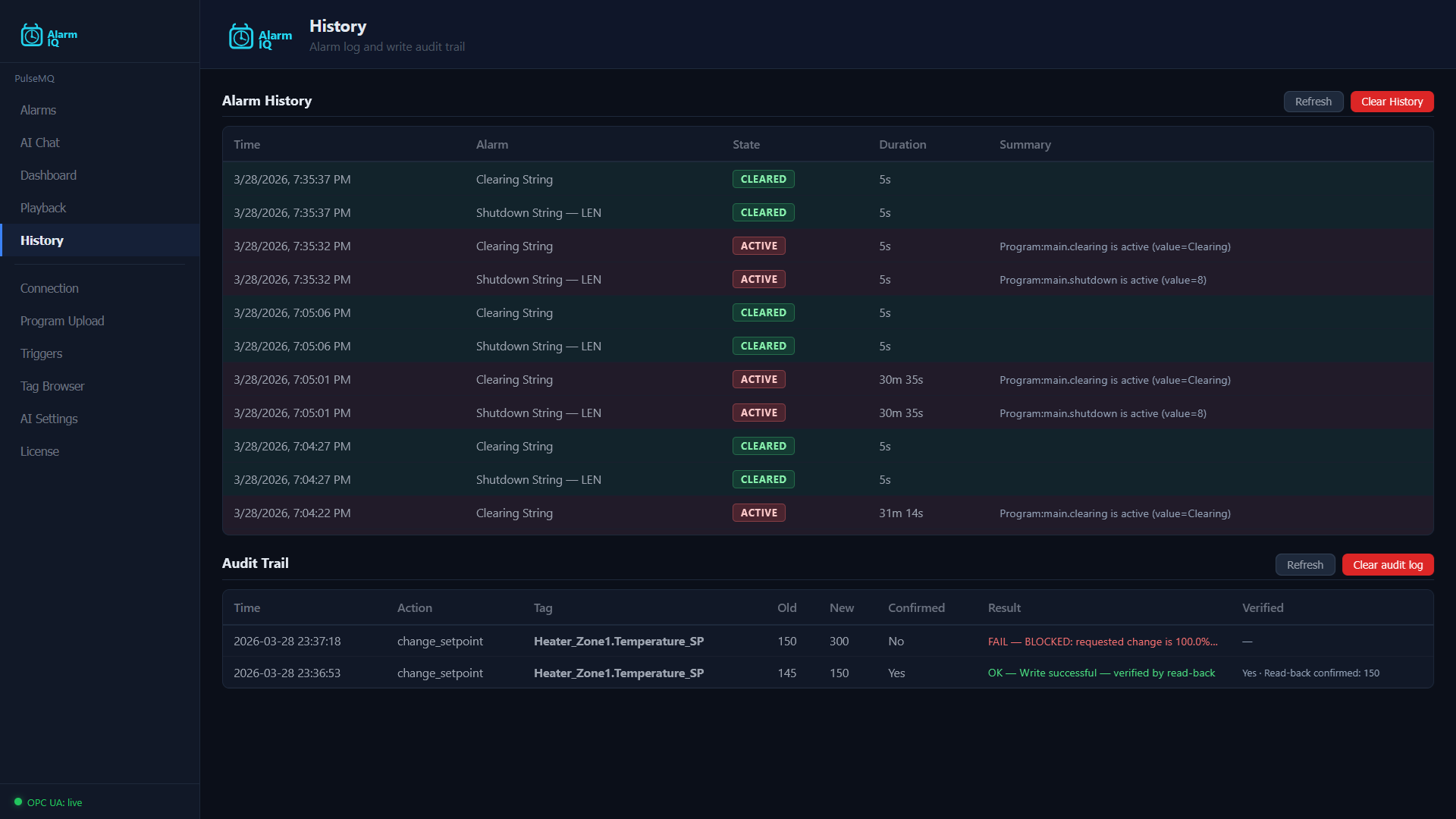
AlarmIQ History showing alarm log with state transitions and audit trail of PLC write operations

History & Audit Trail

Full alarm history with state transitions. Audit trail logs every PLC write with before/after values and verification.

Click to enlarge
AlarmIQ AI Assistant answering live equipment questions with local fast-path responses from PLC data

AI Assistant with Safety Guards

Change setpoints via natural language. 10% safety limit enforced, operator confirmation required, write-back verified from PLC.

Click to enlarge

Pricing

One avoided downtime event pays for months of AlarmIQ.

Contact sales to discuss your deployment.

Monitor

Visibility & insight into every alarm

$147/mo

per controller · $1,499/yr

  • ✓ Real-time root-cause analysis
  • ✓ Automatic alarm & interlock mapping
  • ✓ Alarm timeline & analytics
  • ✓ Cascade & nuisance detection
  • Pre-alarm replay (1 min window)
  • ✓ AI commissioning assistant (setup phase)
  • ✓ 1 controller · 5 users
  • — Voice & equipment control
Contact Sales
MOST POPULAR

Operate

AI + voice + control + full replay

$237/mo

per controller · $2,397/yr

  • ✓ Everything in Monitor
  • AI commissioning assistant (setup phase)
  • Voice interaction — hands-free
  • Safe equipment control
  • Smart write routing — protects recipe parameters
  • Full audit trail & write-then-verify
  • Pre-alarm replay (5 min window)
  • ✓ 1 controller · 10 users
Contact Sales

Professional

Multi-controller & advanced insights

$129/mo

$1,299/yr

  • ✓ Everything in Operate
  • AI commissioning assistant (setup phase)
  • Up to 3 controllers · 15 users
  • Extended pre-alarm replay (10 min window)
  • ✓ Advanced diagnostics & multi-line visibility
  • ✓ Priority performance
Contact Sales

Enterprise

Unlimited — no cloud dependency

$799/mo

$7,999/yr

  • ✓ Everything in Professional
  • AI commissioning assistant (setup phase)
  • Unlimited controllers & users
  • Maximum pre-alarm replay (15 min window)
  • Offline AI — on your network
  • ✓ Priority support & onboarding
  • ✓ Upgrade path to PulseMQ MES
Contact Sales

The math is simple: If your line costs $500/hour when it’s down, and AlarmIQ saves you 30 minutes on a single event, it’s paid for itself. Most plants see that return in the first week — and keep saving every day after as pre-alarm replay cuts root-cause hunts from hours to minutes.

Compare to the typical alternative stack: a dedicated alarm management tool plus a historian plus an operator assistance layer — each one priced, configured, and supported separately. AlarmIQ replaces the full bundle at a fraction of the combined cost.

Frequently Asked Questions

Do I need to modify my controller program?

No. AlarmIQ connects to your controller over the network (read-only for monitoring) and reads your existing program to understand the logic. Your controller program stays exactly as it is.

Does AlarmIQ require internet access?

No. The AI commissioning assistant uses cloud-based AI (Claude) during initial setup, when the system learns your equipment and builds the diagnostic model. After commissioning, AlarmIQ runs 100% offline on your local network — root-cause tracing, alarm analytics, pre-alarm replay, and equipment control all work without any internet connection.

Is it safe to let AI write to my PLC?

Yes. Every write goes through a multi-layer safety pipeline: operator confirmation, 10% setpoint guards, safety tag blacklist, controller mode check, and write-then-verify read-back. Safety-critical tags are permanently blocked. Every operation is logged with a full audit trail.

Which PLCs are supported?

Allen-Bradley ControlLogix and CompactLogix, Siemens S7-1200 and S7-1500, Beckhoff, B&R, and other modern controllers. If your PLC has a network connection, AlarmIQ can connect to it. Contact us to confirm compatibility with your specific equipment.

Can I use this during commissioning?

Yes — this is one of the most valuable use cases. Upload your program, connect to the controller, and AlarmIQ becomes a live commissioning assistant. It shows every interlock state in real time, helps you verify wiring, and identifies issues as you bring the system online.

Do I need a historian for the pre-alarm replay?

No. AlarmIQ captures the minutes leading up to every alarm automatically, stores the frozen window, and makes it available for replay and narration. No separate historian, no point-collector configuration, no per-tag retention policy. The replay window ranges from 1 minute (Monitor) to 5 minutes (Operate) depending on tier.

How do I get started?

Contact sales and we’ll arrange a demo on your equipment. After commissioning, AlarmIQ runs 100% offline on your network — no internet required.